Most campaigns don’t fail because of bad products. They fail because the settings are wrong, the structure is sloppy, and nobody’s watching the right numbers.
If you’ve been running Google Ads for a few months and your cost-per-click keeps climbing while your conversions stay stubbornly flat, that’s not a budget problem. That’s a management problem and it’s fixable.
This guide walks you through how real campaign management works: from account structure and bid strategy to weekly optimisation habits that stop wasted spend before it compounds.
What Google Ads Campaign Management Actually Means
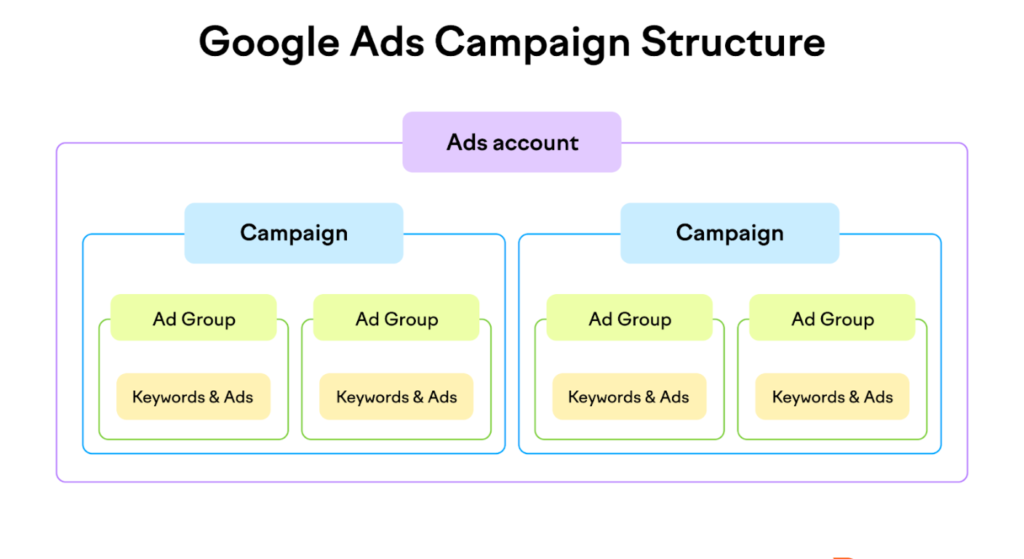
Google Ads campaign management is the ongoing process of structuring, monitoring, and optimising paid search campaigns to improve performance and return on ad spend. It includes bid strategy selection, keyword governance, ad copy testing, Quality Score improvement, and budget pacing not just initial campaign setup.
That definition matters because most people treat Google Ads like a tap you turn on. Set it up, let it run, check results at the end of the month. That approach is precisely why the average small business account bleeds budget on irrelevant clicks.
According to WordStream (2023), the average Google Ads click-through rate across all industries sits at 6.11% on search. Most small business accounts don’t get close to that not because their offers are weak, but because keyword targeting and ad copy aren’t aligned with what the user actually typed.
The gap between a campaign that runs and a campaign that performs is active management.
Smart Campaign vs Expert Mode: The Decision Most People Get Wrong
Here’s the thing: Google’s default onboarding pushes almost every new advertiser toward Smart campaigns. Automated bidding, simplified interface, Google handling the heavy lifting. It sounds like a good deal.
It isn’t for most businesses at this stage.
Quick Comparison:
| Option | Best For | Key Benefit | Limitation |
| Smart Campaigns | Absolute beginners, tiny budgets under £300/month | Minimal setup time, Google automates everything | Near-zero control over keywords, match types, or audience signals |
| Performance Max | Accounts with strong conversion data and multiple asset types | Reaches across all Google channels from one campaign | Requires 50+ conversions/month to optimise reliably; low transparency |
| Manual CPC (Expert Mode) | Accounts learning what converts, building keyword data | Full control over bids per keyword, match type, and placement | Time-intensive; requires weekly attention to avoid wasted spend |
| Target CPA (Expert Mode) | Accounts with 30–50 conversions/month in the last 30 days | Smart bidding with a cost-per-acquisition ceiling | Struggles to exit the “learning phase” on thin conversion data |
| Maximise Conversions | Accounts wanting to exhaust budget efficiently | Simple, results-focused; works on moderate conversion volume | Can overspend quickly; no hard CPA ceiling unless you set a target |
Smart campaigns give Google control you can’t see and can’t override. If your account is under £500/month and you don’t yet know which keywords convert, start in Expert Mode with Manual CPC. You’ll waste some budget learning but you’ll learn things Google will never show you inside a Smart campaign.
Some experts argue Smart campaigns are fine for local service businesses with simple conversion goals. That’s valid for a single-location plumber running call-only ads. But if you’re managing an e-commerce store or a B2B lead gen campaign where intent signals vary wildly, Smart campaigns will flatten the nuance you need to understand.
How to Structure a Google Ads Campaign for Proper Management
To set up a Google Ads campaign you can actually manage and optimise:
- Choose Expert Mode not Smart campaign during setup.
- Build tightly themed ad groups: one core theme per ad group, 5–15 keywords maximum.
- Set match types deliberately start with phrase match, add exact match for proven terms.
- Write at least 3 responsive search ad variants per ad group with distinct headlines.
- Link Google Analytics 4 before activating conversion tracking must fire before spend begins.
- Add a negative keyword list on day one including obvious irrelevant terms for your niche.
Each step matters independently. Skipping conversion tracking and then wondering why you can’t see what’s working is one of the most common and most expensive mistakes in Google Ads campaign management.
Ad Group Theming: Why Tight Groups Outperform Broad Ones
Ad groups are where Quality Score lives or dies. Quality Score Google’s 1–10 rating of how relevant your keyword, ad, and landing page are to each other directly affects both your ad rank and what you pay per click.
An ad group containing running shoes, cheap trainers, sports footwear, and women’s gym kit cannot have a single ad that’s genuinely relevant to all four terms. So Google assigns a mediocre Quality Score across the board, and you pay more per click than a competitor whose ad group contains only three tightly matched keywords with a landing page built around exactly those terms.
One theme. One message. One destination.
Match Types: Don’t Let Google Decide What’s “Close Enough”

Broad match, in 2025, means Google can match your keyword to searches you’d never consciously target. That’s not speculation; it’s documented in Google’s own match type guidance, which acknowledges that broad match uses signals including landing page content and search history to expand reach.
Phrase match is a safer starting point. It requires the core meaning of your keyword to be present in the search query. Exact match gives you the tightest control. Use both, monitor search terms weekly, and move spend toward what converts.
Google Ads Budget Management: Pacing, Allocation, and the Mistake Everyone Makes
Stop. Don’t just set a daily budget and walk away.
Budget management is one of the least discussed and most impactful parts of Google Ads performance management. Here’s how Google actually spends your budget: it can spend up to 2x your daily budget on any given day, as long as your monthly total doesn’t exceed your daily budget multiplied by 30.4. That means a £50/day budget could spend £100 on a Tuesday and £20 on a Thursday.
This matters for two reasons. First, you can’t read daily spend fluctuations as performance signals they’re often just pacing behaviour. Second, if your campaign runs out of budget by noon, you’re invisible for the rest of the day, potentially missing your best-converting hours.
Shared Budgets vs Individual Budgets
For accounts running multiple campaigns, shared budgets let Google allocate spend dynamically across campaigns based on performance signals. That sounds efficient. In practice, it can starve a new campaign that hasn’t yet accumulated enough data to compete with an established one.
Start with individual budgets per campaign. Once you have 60+ days of performance data and clear conversion patterns, shared budgets can be worth testing.
Negative Keywords: The Fastest ROI Lever Nobody Uses Properly
Or maybe I should say it this way negative keywords aren’t a setup task. They’re a weekly maintenance task.
Every week, open your Search Terms report. Export it. Sort by spending descending. Find the queries that consumed the budget without a conversion. Add the irrelevant ones as negatives at the appropriate level campaign-level for broad exclusions, and group-level for nuanced ones.
Users who’ve managed accounts this way consistently report a 15–25% reduction in wasted spend within the first 60 days. That’s not a guarantee, but it’s a pattern that holds when the Search Terms report is reviewed with discipline.
Google Ads Optimisation: The Weekly Habits That Separate Performing Accounts
Look, if you’re checking your Google Ads account once a month and wondering why nothing’s improving, here’s what actually works: a consistent weekly review cycle tied to specific metrics.
Not every metric. The right ones.
Weekly optimisation checklist for active campaign management:
- Search Terms report add negatives, identify new keyword opportunities
- Quality Score by keyword flag anything below 5/10; investigate landing page alignment
- Impression share (IS) if IS is below 60% on your best keywords, you’re leaving traffic on the table; investigate whether it’s budget or rank limiting you
- Conversion rate by device mobile and desktop often convert at dramatically different rates; bid adjustments by device are one of the fastest performance levers
- Ad variation performance pause underperforming ad variants after 200+ impressions; test new headline combinations against your control
- Budget pacing: is any campaign consistently hitting 100% of budget before the end of day?
That’s the list. Not 40 metrics. Six.
The Counter-Intuitive Truth About Quality Score
Most people assume a higher bid fixes a poor ad position. The data says otherwise. Google’s ad auction weights Quality Score heavily. A keyword with a Quality Score of 8 can outrank a competitor bidding 40% more, because Expected CTR, Ad Relevance, and Landing Page Experience multiply together to produce your Ad Rank.
I’ve seen conflicting data on how much QS affects CPC. Some sources suggest a QS of 10 can lower CPC by up to 50% versus a QS of 5, while others put the savings at 30–40%. My read is that the exact percentage varies by auction competitiveness, but the direction is consistent: improve Quality Score and you pay less for the same position.
What most guides skip is the landing page component. Google actually crawls and evaluates the page your ad sends traffic to. If your ad promises certified accountants in Manchester and your landing page is a generic homepage with no mention of Manchester or accounting services, your Quality Score will reflect that mismatch even if your keywords and ad copy are tight.
Conversion Tracking and Attribution: You Cannot Manage What You Cannot Measure
Proper Google Ads campaign management requires accurate conversion tracking before any optimization is meaningful. According to Google’s own setup documentation, conversion tracking must be configured through Google Ads or Google Analytics 4 and verified as firing correctly before campaign data can be used for bid strategy decisions. Without it, automated bidding strategies have no signal to optimise toward.
Attribution modelling determines which clicks in a customer’s journey receive credit for a conversion. According to Google (2024), Data-Driven Attribution (DDA) is now the default model for most account types; it distributes conversion credit across multiple touchpoints using machine learning. For accounts with fewer than 300 conversions per month, DDA may produce unreliable results; Last Click attribution is more stable at low conversion volumes.
Google Analytics 4 integration with Google Ads enables cross-channel attribution and audience building from website behaviour. Linking the two platforms allows you to import GA4 conversion events into Google Ads, giving bid strategies richer data than click-based conversions alone. This is particularly valuable for accounts where the conversion path spans multiple sessions or days before a purchase or enquiry is completed.
Setting Up Conversion Tracking Correctly
Link Google Analytics 4 to your Google Ads account first. Then import your key GA4 conversion events purchase, lead form submission, phone call into Google Ads as primary conversions. Set secondary conversions (page views, scroll depth) to observation only so they don’t confuse your bid strategies.
Check that your conversions are tagged as Primary vs Secondary inside the Conversions settings. This single step is skipped in most tutorials and causes automated bidding to optimise toward soft signals like page views rather than actual revenue events.
Reporting and Performance Management
Manual reporting vs automated Google Ads reports: Manual review of the Search Terms report, Quality Score, and device performance is better suited for accounts under £2,000/month because it builds the hands-on knowledge needed to make good strategic decisions. Automated reports work better when you have a large, stable account with clear conversion patterns and need to surface anomalies at scale. The key difference is that manual review teaches you the account; automated reports monitor it.
Daily: Check spend pacing and flag any campaigns hitting budget cap before end of day.
Weekly: Run the six-metric review listed above. This takes 30–45 minutes when done consistently.
Monthly: Review campaign-level ROAS or CPA against your target. Pause keywords that have spent 3x your target CPA with zero conversions. Reallocate budget toward your top three converting ad groups.
Quarterly: Reassess campaign structure, match type strategy, and whether your bid strategy still fits your conversion volume.
Quick note: Google’s own reporting dashboards default to showing you metrics that look good impressions, clicks, CTR. They don’t default to showing you wasted spend, impression share lost to rank, or Search Term mismatch rate. You have to customise your columns to see what actually matters.
FAQs
Q: What’s the best bid strategy for a new Google Ads campaign?
A: Start with Manual CPC or Maximise Clicks with a CPC cap. Automated strategies like Target CPA need at least 30–50 conversions in 30 days to optimise reliably. Build conversion data first, then switch.
Q: How do I reduce my Google Ads cost-per-click without losing traffic?
A: Improve Quality Score by tightening ad group themes, matching ad copy to keywords, and aligning landing pages. A QS improvement from 5 to 8 can reduce CPC by 30–40% with no bid change.
Q: Should I use broad match or phrase match keywords?
A: Phrase match is the safer default for most accounts. Broad match gives Google significant latitude to match unrelated queries useful only when you have strong audience signals and conversion data to guide it.
Q: Why does my Google Ads campaign spend my budget too quickly?
A: Google can spend up to 2x your daily budget on high-traffic days. If you’re hitting a budget before midday consistently, either raise the daily budget, tighten keyword match types to reduce low-quality traffic, or use ad scheduling to focus on your highest-converting hours.
Q: When should I hire an agency to manage my Google Ads?
A: When the time cost of weekly management exceeds what you’d pay an agency, or when your account has grown complex enough that optimisation decisions require specialist knowledge typically around £2,000+/month in ad spend it’s worth evaluating professional management.