
Most business owners who try Google Ads the first time walk away confused. Not because the platform is broken but because nobody explained the one thing that controls everything: the auction.
Here’s what this guide covers: how the auction sets your real CPC, what a realistic budget gets you, how to set up a campaign without wasting your first $500, and when Google PPC actually makes sense for a small or mid-sized business.
What Are Google Pay Per Click Ads And How Does the Auction Work?
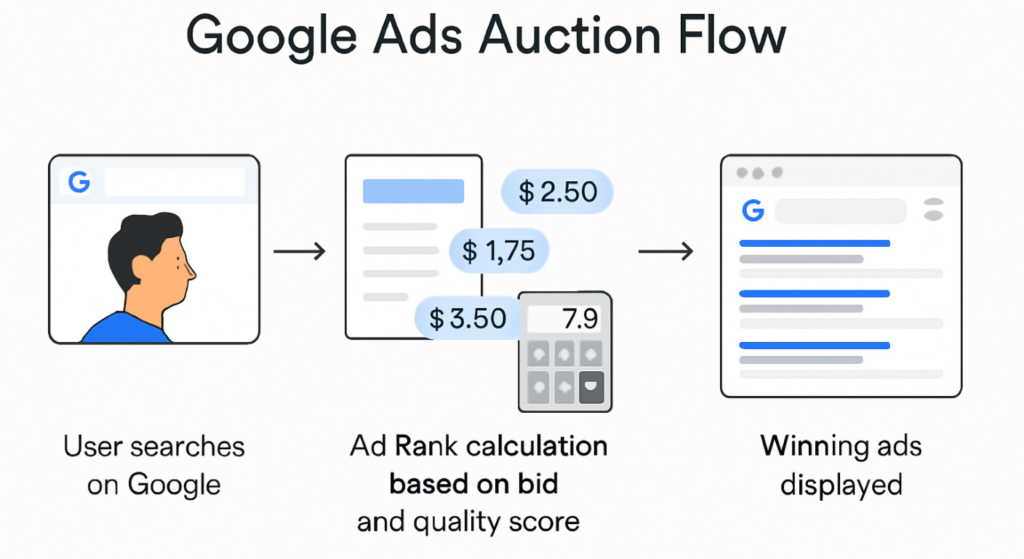
Google pay per click ads are paid search placements where advertisers bid for visibility on Google’s search results page and pay only when a user clicks their ad. Unlike traditional advertising, you’re not paying for impressions, you’re paying for action.
That part most people know. Here’s what they miss.
How the auction actually determines your cost:
Google runs a real-time auction every single time someone searches. Your position and what you pay isn’t determined by who bids the most. It’s determined by Ad Rank, which is calculated like this:
Ad Rank = Your Bid × Quality Score × Expected Impact of Ad Extensions
Quality Score is Google’s 1–10 rating of how relevant your keyword, ad copy, and landing page are to the search. A competitor with a $2.00 bid and a Quality Score of 9 can outrank you at a $5.00 bid with a Quality Score of 3 and pay less per click doing it.
This is the single most important insight most PPC guides skip entirely.
According to WordStream’s 2024 Google Ads Benchmarks report, the average CPC across all industries on Google Search is $4.22. But that’s a mean across wildly different markets: legal services average over $9.00 per click, while arts and entertainment can be under $1.50.
This works best for businesses with a defined conversion goal (lead form, phone call, product purchase). It won’t help if you don’t know what a customer is worth to you because you can’t evaluate whether any CPC is actually profitable without that number.
Google pay per click ads work by entering advertisers into a real-time auction each time a user performs a relevant search. According to Google’s own platform documentation, your ad position is determined by Ad Rank, a combination of your maximum bid, Quality Score, and expected ad extension impact not by bid alone. A highly relevant ad with a lower bid can outrank and outperform a higher-spending competitor.
What Does Google PPC Actually Cost Real Numbers for Small Budgets
Let’s be direct about this. The $1 to $50 per click range you’ve probably read is technically true and completely useless.
Here’s what actually matters.
Average CPCs by industry (WordStream, 2024):
| Industry | Avg. CPC | Avg. Conversion Rate |
| Legal Services | $9.21 | 6.98% |
| Home Services | $6.55 | 7.15% |
| Healthcare | $3.17 | 3.36% |
| E-commerce / Retail | $1.16 | 2.81% |
| B2B / SaaS | $5.08 | 3.04% |
| Real Estate | $2.37 | 2.47% |
Quick note: conversion rate here means the percentage of clicks that turn into a lead or sale not visitors who browse and leave.
If you’re a home services business spending $1,000/month, at a $6.55 average CPC, you’re buying roughly 152 clicks. At a 7% conversion rate, that’s about 10–11 leads per month. Whether that’s worth $1,000 depends entirely on what a lead is worth to your business.
This is the math most articles don’t walk you through.
Google’s own Economic Impact data (2023) shows businesses earn an average of $2 in revenue for every $1 spent on Google Ads. That 2:1 ratio holds at scale but for a brand-new campaign with no historical data, no optimized Quality Score, and no split-tested landing page, your first 60–90 days will almost certainly underperform that benchmark.
That’s not a warning to avoid Google PPC. That’s a reason to treat your first month as a data-collection phase, not a profitability test.
How much Google pay per click ads cost depends on your industry, keyword competitiveness, and Quality Score. According to WordStream’s 2024 benchmarks, the average CPC across all industries is $4.22, but ranges from under $1.50 in entertainment to over $9.00 in legal services. A $1,000/month budget typically generates between 100 and 800 clicks depending on your market.
How to Set Up Google Pay Per Click Ads Without Wasting Your First $500

Setup isn’t complicated. Spending money badly on setup is where most beginners fail.
To launch a Google Search PPC campaign, follow these steps:
- Create your Google Ads account at ads.google.com choose Switch to Expert Mode immediately to avoid Smart campaigns, which give you less control.
- Set your campaign objective, select Leads or Website traffic depending on your goal. Avoid Sales unless you have e-commerce tracking fully configured.
- Research keywords using Google Keyword Planner filter for keywords with monthly search volume between 100–10,000 and medium competition. Ignore broad vanity keywords with 100,000+ searches.
- Build tightly themed ad groups each ad group should contain 5–10 closely related keywords. Don’t mix emergency plumber and plumbing services prices in the same group.
- Write 3 responsive search ad variations Google’s Responsive Search Ads (RSAs) let you input up to 15 headlines and 4 descriptions; Google tests combinations automatically.
- Set your bidding strategy for new campaigns with no conversion data, use Maximize Clicks with a CPC cap, not Target CPA, which needs at least 30–50 conversions to function properly.
- Configure conversion tracking is non-negotiable. Without it, you’re flying blind and Google’s algorithm has nothing to optimize toward.
Each step should take under 30 minutes. The one that takes longer and the one most people skip is step 7.
Google pay per click ads are a form of paid digital advertising where businesses bid for placement on Google’s search results page and pay only when a user clicks their ad. Ad position is determined by Ad Rank, a formula combining bid amount, Quality Score, and ad extension impact not by highest spend alone.
Google Ads Bidding Strategy: Which One Should You Actually Use
This is where people overcomplicate things. There are roughly eight bidding strategies in Google Ads. For most small business advertisers, only two matter at the start.
Quick Comparison:
| Bidding Strategy | Best For | Key Benefit | Limitation |
| Maximize Clicks | New campaigns, no conversion data | Gets traffic fast, easy to control | Doesn’t optimize for quality of clicks |
| Target CPA | Campaigns with 30–50+ conversions/month | Lets Google’s AI optimize for cost per lead | Fails without sufficient historical data |
| Maximize Conversions | Mid-stage campaigns building conversion history | Good bridge between Clicks and Target CPA | Can overspend daily budget early on |
| Manual CPC | Advanced users who want full bid control | Total granular control | Time-intensive, requires experience to not waste spend |
| Target ROAS | E-commerce with tracked revenue values | Directly tied to revenue goals | Needs substantial sales data to work correctly |
Look, if you’re running your first campaign with a $1,000/month budget and zero conversion history, Maximize Clicks with a manual CPC cap is your starting point. Every other strategy either needs data you don’t have yet or requires optimization time you can’t afford to waste money during.
Some experts argue that Smart Bidding strategies like Target CPA should be used from day one to let Google’s machine learning take over. That’s valid for accounts migrating from an established campaign with existing data. But if you’re dealing with a brand-new account and a limited budget, handing Google’s algorithm full control before it has any signal to work with is how you burn $800 in two days on irrelevant clicks.
To launch your first Google pay per click campaign, follow these steps:
- Create your account at ads.google.com and select Expert Mode.
- Choose Leads or Website traffic as your campaign objective.
- Research keywords using Google Keyword Planner target medium competition terms.
- Build tightly themed ad groups with 5–10 related keywords each.
- Set bidding to Maximize Clicks with a CPC cap until you have conversion data.
- Install conversion tracking before your campaign goes live.
Google PPC for Small Business: When It Works and When It Doesn’t
Here’s the thing: Google pay per click ads are not universally the right channel. The platform rewards intent people actively searching for what you offer. If your product requires education before someone searches for it, or if you’re in a category where nobody searches on Google, PPC won’t fix that.
Google PPC works well when:
- Your customers search for your product or service by name or category (e.g., emergency electrician near me, project management software for teams)
- Your average customer lifetime value is high enough to justify a $3–$10+ CPC
- You have a specific, trackable conversion action (call, form, purchase)
- You can commit to at least 90 days of testing and optimization
Google PPC underperforms when:
- You’re introducing a genuinely new product category that has no existing search demand
- Your landing page converts below 1–2% (the ads will send traffic but traffic alone doesn’t fix a broken offer)
- Your budget is under $300/month in a competitive vertical (you won’t gather meaningful data fast enough to optimize)
Or maybe I should say it this way: the question isn’t whether Google Ads works. It does, for the right businesses. The question is whether your specific situation gives it enough room to work.
Users who’ve run Google Ads without conversion tracking consistently report the same outcome: they spent money, saw clicks, had no idea which keywords drove anything valuable, and paused the campaign calling it a failure. The campaign wasn’t a failure. The measurement setup was.
Google pay per click ads work best for businesses in categories with active search demand, a defined conversion goal, and a customer value high enough to justify the average CPC in their industry. According to Google’s 2023 Economic Impact data, businesses average $2 in return for every $1 spent but this assumes properly configured conversion tracking, optimized Quality Scores, and at least 60–90 days of data collection before drawing conclusions.
Google Ads vs. Facebook Ads: Google Ads is better suited for capturing existing demand people actively searching for your product or service because it places your ad at the moment of intent. Facebook Ads work better when building awareness for a product people aren’t yet searching for. The key difference is intent timing: Google captures it, Facebook creates it.
FAQs
Q: What’s the best bidding strategy for a new Google Ads account?
A: Start with Maximize Clicks and set a manual CPC cap. Target CPA and Smart Bidding strategies require at least 30–50 conversions of historical data to function correctly without it, they overspend without direction.
Q: How do I know what I’ll pay per click on Google Ads?
A: Use Google Keyword Planner to see estimated CPC ranges for your target keywords. Your actual CPC will depend on your Quality Score. A higher-quality ad and landing page can reduce what you pay even against higher-bidding competitors.
Q: Should I use broad match or exact match keywords on Google?
A: For new campaigns, use phrase match and exact match keywords. Broad match triggers your ads for loosely related searches and burns budget fast without conversion data to guide Google’s algorithm.
Q: Why does my Google Ads account spend money but get no leads?
A: The most common causes are: no conversion tracking installed, landing page not matching ad messaging, or keyword match types too broad. Fix tracking first you can’t optimize what you can’t measure.
Q: When should I increase my Google Ads budget?
A: Increase budget only after your campaign has a Cost Per Acquisition you’re happy with and is hitting its daily budget cap consistently. Scaling a campaign that isn’t converting yet just accelerates the loss.