This guide covers Google Search and Display campaign strategy for B2B companies with deal cycles longer than 30 days and average contract values above $5,000. It does NOT address ecommerce, B2C lead gen, or Performance Max as a standalone strategy that requires a completely different framework.
B2B Google Ads refers to paid search and display campaigns on Google’s advertising platform structured specifically for business-to-business marketing where the buyer is a professional, the sales cycle spans weeks or months, and a single converted lead can be worth tens of thousands of dollars. Unlike B2C campaigns, success isn’t measured in volume. It’s measured in pipeline quality.
That distinction changes everything about how you build these campaigns.
Why Most B2B Google Ads Campaigns Fail Before They Start
The playbook most teams follow was built for B2C. High volume, broad match, let the algorithm optimize. That approach works when your product costs $49 and converts in one session.
B2B buying doesn’t work that way.
According to Google’s own research (Think with Google, 2023), the average B2B buyer conducts 12 searches before engaging with a specific brand’s website and 89% of B2B researchers use the internet at some point during the research process. That means your buyer isn’t converting on the first click. They’re researching, comparing, disappearing, and coming back. A campaign that’s only optimized for immediate conversions will bleed budget on the 11 touches that never get credited.
Here’s the thing: the algorithm isn’t broken. It’s just optimizing for the wrong signal.
When you run Smart Campaigns or broad matches without guardrails, Google finds clicks that match your surface-level keywords. Business software, Project management tool, CRM system. Those terms pull in job seekers, students, freelancers, and hobbyists none of whom will ever become your customer. Your CTR looks fine. Your CPL is catastrophic.
Most people assume broad matches are the problem. The data says otherwise broad matches can work in B2B, but only when paired with aggressive audience layering and a tightly controlled negative keyword list. The match type isn’t the villain. The missing structure is.
The Foundation: Campaign Structure Built for B2B Buying Cycles
What most guides skip is how the B2B buying cycle maps to campaign structure. This isn’t a messaging problem, it’s an architecture problem.
A B2B buyer moves through three distinct phases: awareness (researching the problem), consideration (evaluating solutions), and decision (selecting a vendor). Your campaigns need to exist in all three phases, not just the bottom.
To build a B2B Google Ads structure that matches the buying cycle, follow these steps:
- Segment campaigns by funnel stage separate awareness, consideration, and decision campaigns
- Assign distinct match types per stage broad match for awareness, phrase for consideration, exact for decision
- Build a master negative keyword list minimum 200 terms before launch, covering consumer, job-seeker, and student intent
- Layer RLSA audiences bid higher on past website visitors at the decision stage
- Set conversion actions by stage content downloads for awareness, demo requests for decision
Each step is a separate budget decision. Don’t pool everything into one campaign and hope the algorithm sorts it out.
Quick note: most B2B accounts I’ve reviewed have zero funnel segmentation. One campaign. One ad group. Everything mixed. That’s not a bidding problem, that’s a structural one, and no amount of budget increase will fix it.
Negative Keywords: The Most Underused B2B Lever
Stop here. Before you touch bids, audiences, or ad copy build your negative keyword list.
This is the single highest-ROI action in B2B Google Ads. Nothing else comes close.
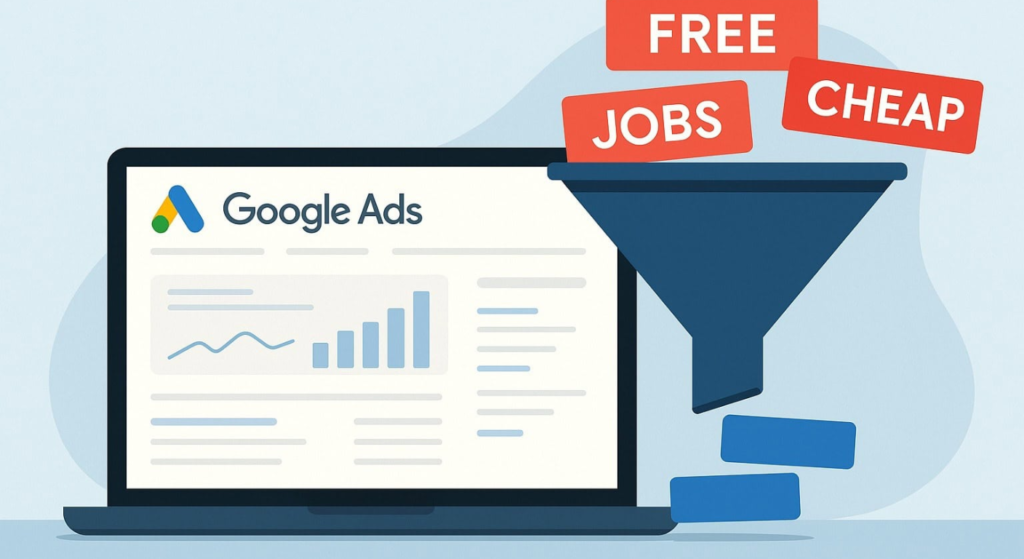
B2B keywords attract enormous consumer demand. Search CRM software and you’ll find small businesses, students researching coursework, people comparing free tools, and job seekers looking for CRM software jobs. None of them are your buyer. All of them cost you money.
Your negative keyword list should cover at minimum:
- Job and career terms: “jobs,” “salary,” “careers,” “hiring,” “resume,” “internship,” “entry level”
- Education terms: “course,” “tutorial,” “how to learn,” “certification,” “free training,” “what is”
- Consumer intent terms: “cheap,” “free,” “DIY,” “personal use,” “small business” (if you’re enterprise-focused)
- Competitor brand names (unless you’re running a deliberate conquest campaign)
- Irrelevant industry verticals if you sell to manufacturing, exclude healthcare terms and vice versa
I’ve seen conflicting data on the right negative list size some sources say 50 terms is sufficient, others recommend 500+. My read is that 150–250 highly specific negatives outperforms a bloated list of vague ones. Quality over quantity. Review your Search Terms Report weekly for the first 90 days and add aggressively.
Apply negatives at the account level first, then layer campaign-specific additions on top.
Audience Layering: How to Use B2B Signals Inside Google Search
Google Search doesn’t have LinkedIn’s job title targeting. That’s a real limitation and anyone who tells you otherwise is selling something.
But that doesn’t mean audience signals don’t exist inside Google Ads. They just work differently.
Google Ads Customer Match lets you upload your CRM contact list existing customers, lost deals, open opportunities and match them to Google accounts. Use this to:
- Exclude current customers from prospecting campaigns (stop wasting money on people who already bought)
- Bid up on contacts already in your pipeline who are still searching (they’re comparing you to competitors right now)
- Create lookalike-style segments based on your highest-LTV customer list
In-Market Audiences for B2B Google has pre-built in-market segments like Business Software & Services, Enterprise Software, and CRM & ERP Software. These aren’t perfect. They’re built on behavioral signals, not job titles. But used as bid modifiers on Search campaigns (not as standalone targeting), they help you skew budget toward more likely buyers without restricting reach.
Customer Match vs. In-Market Audiences:
| Option | Best For | Key Benefit | Limitation |
| Customer Match | Existing pipeline & CRM lists | Precision — matches real contacts | Requires minimum list size (1,000 matched users) |
| In-Market Audiences | Cold prospecting at scale | Broad behavioral intent signals | Not job-title specific — bleed risk remains |
| RLSA (Remarketing Lists) | Warm leads revisiting site | Higher conversion rates on return visits | Only works after traffic is already flowing |
| Similar Segments | Lookalike prospecting | Expands reach beyond known contacts | Less predictable in B2B niche verticals |
| Demographic Layering | Filtering obvious non-buyers | Removes students, retired users by age | Blunt instrument — misses plenty of noise |
Look, if you’re a SaaS company selling to mid-market companies and your average deal is $30,000+, here’s what actually works: Customer Match for pipeline acceleration, RLSA for bottom-funnel, and In-Market as a bid modifier only. Don’t rely on In-Market as your primary targeting mechanism. It’s too loose for serious B2B.
Bidding Strategy for Low-Volume B2B Keywords
This is where B2B Google Ads gets genuinely hard. And where most generic PPC advice falls apart.
B2B keywords have low search volume. Enterprise contract management software might get 90 searches per month globally. Google’s automated bidding strategies Target CPA, Target ROAS, Maximize Conversions need data to function. Specifically, they need roughly 30–50 conversions per month per campaign to optimize reliably.
Most B2B accounts will never hit that threshold on a single campaign.
Or maybe I should say it this way: the conversions exist, but they’re spread across too many campaigns, too many keywords, and too long a time window for the algorithm to learn from them efficiently.
The solution isn’t to abandon smart bidding. It’s to restructure around it:
- Consolidate campaigns fewer, broader campaigns give the algorithm more conversion data to learn from
- Use micro-conversions as bidding signals content downloads, video completions, chatbot engagements, and time-on-site events fed into Google Ads as conversion actions (with lower conversion value) keep the algorithm warm between actual lead form submissions
- Start with Maximize Clicks with a CPC cap for new campaigns with zero history, this builds data without overpaying
- Graduate to Target CPA only after 60+ conversions resist the pressure to switch early; it will misfire
Some experts argue that Manual CPC gives B2B advertisers more control in low-volume niches. That’s valid for campaigns under 500 impressions per month where you have very specific keyword intent. But if you’re managing a multi-keyword B2B account with any meaningful scale, manual bidding becomes a full-time job and introduces human error that outpaces its benefits.
Attribution and the Long B2B Sales Cycle Problem
Here’s what kills more B2B Google Ads accounts than anything else: last-click attribution in a 90-day sales cycle.
A buyer clicks your ad in January. They visit your site. They leave. They come back via organic search in February. They download a whitepaper. They request a demo in March after a colleague emails them the link. Your Google Ads account sees: zero conversions. Leadership sees: wasted spend. Campaign gets cut.
The click that started that journey gets no credit. And you lose the budget that was working.
Fix this with offline conversion import. If you’re using Salesforce or HubSpot as your CRM, connect it to Google Ads via the offline conversion import API. When a lead from a Google Ads click progresses to qualified opportunity or closed won in your CRM that signal gets sent back to Google Ads. Now the algorithm knows which keywords and audiences are generating real pipelines, not just form fills.
According to Google’s conversion tracking documentation (Google Ads Help, 2024), advertisers using offline conversion imports see an average 20% improvement in lead quality versus optimizing on online-only signals.
That 20% matters enormously when your average deal is $50,000.
Attribution model: For B2B, use data-driven attribution if you have sufficient conversion volume, or linear attribution if you don’t. Avoid last-click entirely. It actively punishes your awareness-stage investment and trains the algorithm to abandon the top of your funnel.
FAQs
Q: What’s the best bidding strategy for B2B Google Ads?
A: Start with Maximize Clicks with a CPC cap to build data, then move to Target CPA once you have 50+ conversions. Smart bidding underperforms in B2B until it has enough conversion history to learn from.
Q: How do I stop B2B Google Ads from attracting consumer traffic?
A: Build a negative keyword list of 150–250 terms covering job-seeker, student, and consumer intent before launch. Review your Search Terms Report weekly and add negatives aggressively for the first 90 days.
Q: Should I use broad matches for B2B Google Ads campaigns?
A: Yes, but only with audience layering and a strong negative keyword list in place. Broad matches without these guardrails will burn your budget on irrelevant traffic. With them, it can expand reach effectively.
Q: Why does my B2B Google Ads cost-per-lead keep rising?
A: Usually caused by insufficient negative keywords, wrong attribution model, or smart bidding without enough conversion data. Audit your Search Terms Report, check your attribution settings, and ensure micro-conversions are feeding the algorithm.
Q: When should I use Customer Match in B2B Google Ads?
A: Use Customer Match when you have a CRM list of 1,000+ contacts. Apply it to exclude existing customers from prospecting, bid up on active pipeline contacts, and build lookalike audiences from your best-fit customer data.
This guide covers Google Search and Display for established B2B campaigns. It does not address YouTube advertising for B2B, Performance Max campaign structures, or Google Ads for B2B companies with fewer than $3,000/month in budget those scenarios require a different approach where the economics work differently.