You’ve probably heard that Google Ads can drive real customers to your business fast. That part is true. What nobody tells you upfront is that the system rewards advertisers who understand it and quietly penalises those who don’t.
This isn’t a Google sales page. So let’s get into how it actually works.
What Are Google Pay Per Click Ads, Exactly?
Google pay per click ads are paid search listings that appear at the top (and sometimes bottom) of Google’s search results page. You set a bid, write an ad, and pay only when someone clicks. The cost per click varies by keyword, competition, and how Google rates the quality of your ad and landing page.
That’s the definition. Here’s what it means in practice.
When someone types emergency plumber London into Google, a live auction runs in the fraction of a second before results appear. Every advertiser targeting that keyword competes in that auction but the winner isn’t always the highest bidder. Google factors in your Quality Score, a 1–10 rating based on how relevant your ad and landing page are to the search query.
Higher Quality Score = lower cost per click, better ad position. It’s the part most beginner guides skip entirely.
Google pay per click ads are a form of paid search advertising where businesses bid on keywords and pay only when a user clicks their ad. Ads appear at the top of Google Search results, and placement is determined by both bid amount and ad quality score, not budget size alone.
How the Google Ads Auction Actually Works
Most people assume you need the biggest budget to win. That’s not quite right.
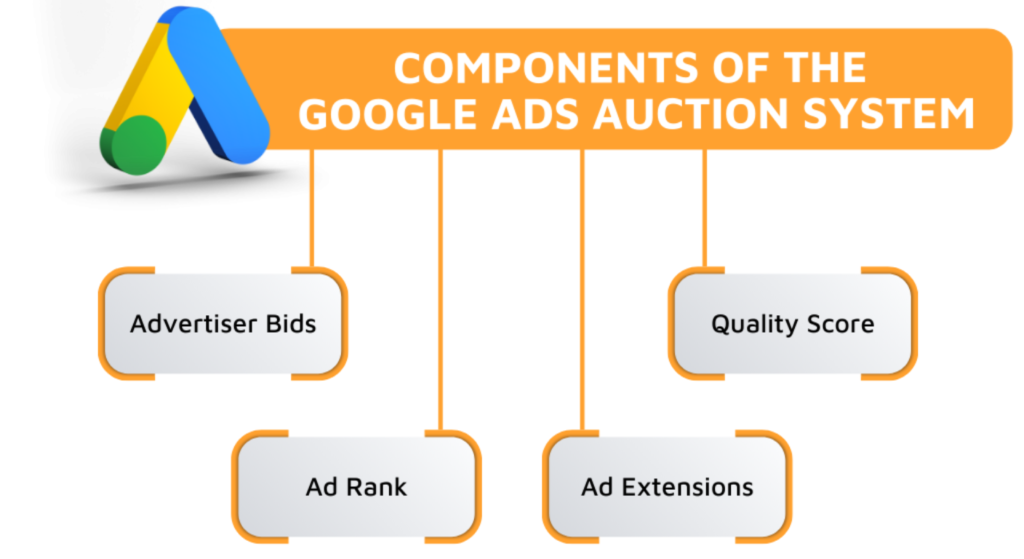
Google’s Ad Rank formula decides who shows up and in what position. It combines your maximum bid, your Quality Score, and the expected impact of your ad extensions (things like phone numbers, sitelinks, or star ratings). A well-optimised ad with a £2 bid can outrank a competitor bidding £5 if the Quality Score gap is large enough.
Here’s where it gets interesting. You don’t always pay your maximum bid. Google’s auction is second-price you pay just enough to beat the advertiser below you, not your full bid ceiling. So if you bid £4 and your nearest competitor bids £2.50, you might only pay £2.51.
Quick note: this is why obsessing over your max bid alone is a trap. Quality Score is the lever that actually moves your cost-per-click down over time.
To understand how a Google Ads auction determines your ad position, follow these steps:
- Set a maximum cost-per-click bid for your target keyword
- Write ad copy that directly matches the search intent of that keyword
- Build or optimise the landing page your ad points to it must match the ad’s promise
- Add at least two ad extensions relevant to your business type
- Monitor your Quality Score in the Google Ads dashboard after your first 100 impressions
Each step takes under 30 minutes for a first campaign. The landing page is where most beginners lose the most money.
What Does Google PPC Actually Cost? Real Numbers, Not Ranges
Let’s talk about money because vague answers like it depends are genuinely useless when you’re trying to plan a budget.
According to WordStream’s Google Ads Benchmarks report (2023), the average cost per click across all industries on Google Search is $4.22. The average click-through rate is 6.11%. But those averages mask enormous variation by industry.
Legal services: average CPC above $50. E-commerce: closer to $1.50–$2.50. Home services like HVAC or roofing: $6–$12 per click. These aren’t ceiling numbers. In competitive local markets, they’re basements.
So what does a realistic monthly budget look like? A small business running Google Search Ads in a mid-competition niche, targeting a single city, can expect to spend £500–£1,500/month to generate meaningful data. Below £300/month, you often don’t get enough clicks to optimise properly the learning period drags on, and you can’t tell what’s working.
That’s my read, at least. I’ve seen conflicting advice here; some sources suggest starting with as little as £150/month to test the waters. Others argue that anything under £500 produces too little signal to make real decisions. Both positions have merit depending on your keyword CPCs, but for most local service businesses, I’d lean toward the higher end as a starting point.
The Three Hidden Costs Nobody Warns You About

This is where Google’s own resources go quiet. And it’s the part that matters most in your first week.
1. Poor landing page relevance inflates your CPC silently
If your ad says affordable kitchen fitting in Manchester but your landing page is a generic homepage with five services listed, Google reads that as a mismatch. Your Quality Score drops. Your CPC rises. You could be paying 30–60% more per click than a competitor with an identical bid and a better-matched landing page.
You won’t get an alert. The cost just quietly goes up.
2. What happens when your daily budget runs out mid-morning
Google pauses your ads for the rest of the day once you hit your daily budget limit. If you’re a restaurant targeting lunch searches and your £20 budget runs out at 10am, you’re invisible for the hours that matter most. The fix is either increasing your budget or using ad scheduling to concentrate during peak hours but you have to know this is happening to fix it.
3. Broad match keywords eating budget on irrelevant searches
If you bid on the keyword accountant using broad match, Google can show your ad for searches like accountant salary, free accounting software, or accountant memes. Yes, really. Every one of those irrelevant clicks costs you real money. Negative keywords terms you explicitly exclude are not optional. They’re essential from day one.
Google PPC vs Other Paid Channels: Where It Fits
Google Pay Per Click Ads vs Facebook Ads: Google Search Ads capture demand that already exists someone is actively searching for what you sell. Facebook Ads create demand by interrupting users while they scroll. Google PPC is better suited for high-intent, purchase-ready searches. Facebook works better for brand awareness, visual products, and retargeting audiences who already know you.
| Option | Best For | Key Benefit | Limitation |
| Google Search Ads | Capturing active search intent | High purchase intent at point of search | Higher CPCs in competitive niches |
| Google Display Ads | Brand awareness, retargeting | Wide reach, visual format, lower CPCs | Lower intent, more irrelevant clicks |
| Facebook / Meta Ads | Audience-based targeting, visual products | Granular demographic targeting | Interruption-based, lower purchase intent |
| SEO (Organic Search) | Long-term traffic without per-click cost | No ongoing cost per click | Slow to build, 6–12 months minimum |
| Microsoft Ads (Bing) | Budget-conscious search advertising | Lower CPCs, less competition | Smaller search volume |
How to Set Up Your First Google PPC Campaign Without Wasting Your Budget
Some experts argue you should use Google’s Smart campaigns as a beginner the automated option that handles bidding and targeting for you. That’s valid if your only goal is simplicity. But if you want control over where your money goes, and you want to actually learn how the system works, manual campaigns with manual CPC bidding give you far more visibility into what’s happening.
Or maybe I should say it this way: Smart campaigns are easier to start, harder to improve. Manual campaigns take 30 more minutes to set up and give you 10 times more data to work with.
Here’s a realistic starting framework:
- Campaign type: Search only (not Search + Display — that setting silently extends your ads to Display without you realising)
- Keyword match types: Start with phrase match and exact match. Avoid broad match until you know what you’re doing
- Daily budget: Set it to what you’re genuinely comfortable losing while learning not what you hope to profit from
- Bidding strategy: Manual CPC to start. Switch to Target CPA only once you have at least 30 conversions tracked
- Negative keywords: Add a list before your campaign goes live. Minimum 20 terms. Use Google Keyword Planner and SEMrush to find what’s adjacent to your keywords but irrelevant to your business
Look, if you’re a local service business with a £600/month budget and no prior Google Ads experience, here’s what actually works: one tightly focused campaign, one ad group per service type, two to three ads per group, and a dedicated landing page for each ad group. Not one homepage. One landing page per service.
That’s it. The accounts that waste the most money are the ones trying to do everything at once in month one.
What Most Guides Skip: Quality Score in Plain English
Most people assume Quality Score is a vanity metric. It isn’t. It directly determines how much you pay for every single click.
Google rates your Quality Score on three components: expected click-through rate (does your ad match what people want to click?), ad relevance (does your ad copy match the keyword?), and landing page experience (does the page deliver what the ad promised?). Each is rated below average, average, or above average.
A Quality Score of 3 on a £3 CPC bid can result in you paying more per click than a competitor with a Quality Score of 8 bidding £4. The math goes the wrong way for the low-quality account every time.
What most guides skip is that landing page experience is the hardest component to improve and the most commonly neglected. Page load speed, mobile responsiveness, and whether the page content directly matches the ad headline all of these factor in. Google crawls your landing page. It knows if you’re sending someone who clicked emergency boiler repair to a page about your company history.
FAQs
Q: What’s the best bidding strategy for a first Google Ads campaign?
A: Start with Manual CPC to stay in control of spend. Switch to Target CPA only after recording at least 30 conversions Google’s algorithm needs that data before automated bidding becomes reliable.
Q: How do I know if my Google PPC campaign is working?
A: Track conversions, not just clicks. A 5% click-through rate means nothing if those clicks don’t turn into calls, form fills, or purchases. Set up conversion tracking before your campaign goes live.
Q: Should I use broad match keywords in Google Ads?
A: Not at the start. Broad match generates the most impressions but also the most irrelevant clicks. Use phrase match and exact match first, then test broad match only after you have a solid negative keyword list.
Q: Why does my Google Ads cost per click keep going up?
A: Rising CPC usually means increased competition for your keywords, a drop in your Quality Score, or both. Check your landing page relevance and ad copy match first. Those are the fastest fixes.
Q: When should I hire an agency to manage my Google Ads?
A: When your monthly ad spend exceeds £1,500–£2,000, or when managing the account takes more than 3–4 hours per week that you don’t have. At that point, an agency’s optimization typically more than covers their fee.
This guide covers Google Search Ads fundamentals for small business owners. It does not address Performance Max, Google Shopping, video campaigns, or advanced audience layering strategies.