
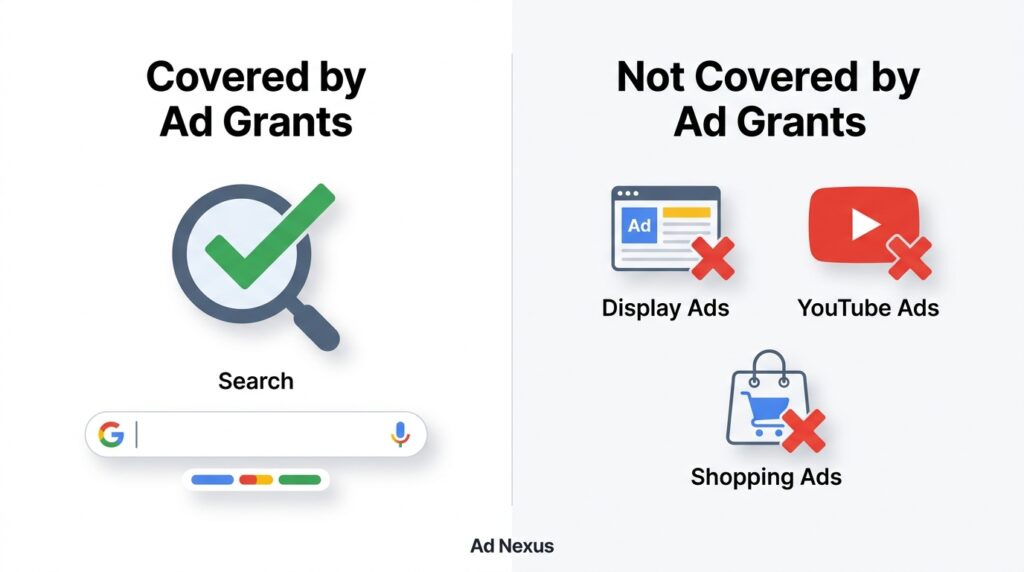
Google Ad Grants is a program run by Google that gives eligible nonprofit organizations up to $10,000 USD per month in free Google Search advertising credits. The credits appear as in-account budget not a check and can only be used for text-based search ads on Google.com. Nonprofits cannot use the grant for Display, YouTube, or Shopping campaigns.
That one clarifying sentence matters more than most guides let on. A lot of organizations sign up expecting broad advertising flexibility. They don’t get it. What they do get when managed correctly is consistent, targeted traffic from people already searching for what the nonprofit does.
According to Google for Nonprofits Program data (2023), the program has distributed over $10 billion in free advertising to more than 115,000 nonprofits across 51 countries since its launch. That’s not a small side project. It’s one of the largest in-kind donation programs in the tech industry.
Who Actually Qualifies for Google Ad Grants
Here’s the thing: not every nonprofit gets in. Google’s eligibility criteria are specific, and misunderstanding them is where most applications fall apart.
You must meet ALL of the following to qualify:
- Hold valid charitable status in your country (501(c)(3) in the US; registered charity status in the UK, Canada, Australia, and most other supported countries)
- Be enrolled in Google for Nonprofits the prerequisite program that gates access to all Google’s nonprofit tools
- Verified through TechSoup (in the US and many other countries) or Goodstack (formerly Percent, used in the UK and parts of Europe) as the approved validation partner
- Have a live, functioning website with a clear mission statement
- Agree to Google’s non-discrimination and donation receipt policies
Who is NOT eligible:
- Government entities and government-run organizations
- Hospitals and healthcare organizations (even nonprofit ones)
- Schools, academic institutions, and universities though their philanthropic arms sometimes qualify separately
- Political organizations and campaigns
Quick note: the hospital and school exclusions surprise people. A children’s hospital foundation may qualify even if the hospital itself doesn’t but that distinction requires careful review of your legal entity structure before applying.
Or maybe I should say it this way: if your organization has any overlap with healthcare or education in its registered purpose, verify your eligibility with a Google for Nonprofits representative before investing time in the application.
The Real Application Timeline Start to Live Campaigns
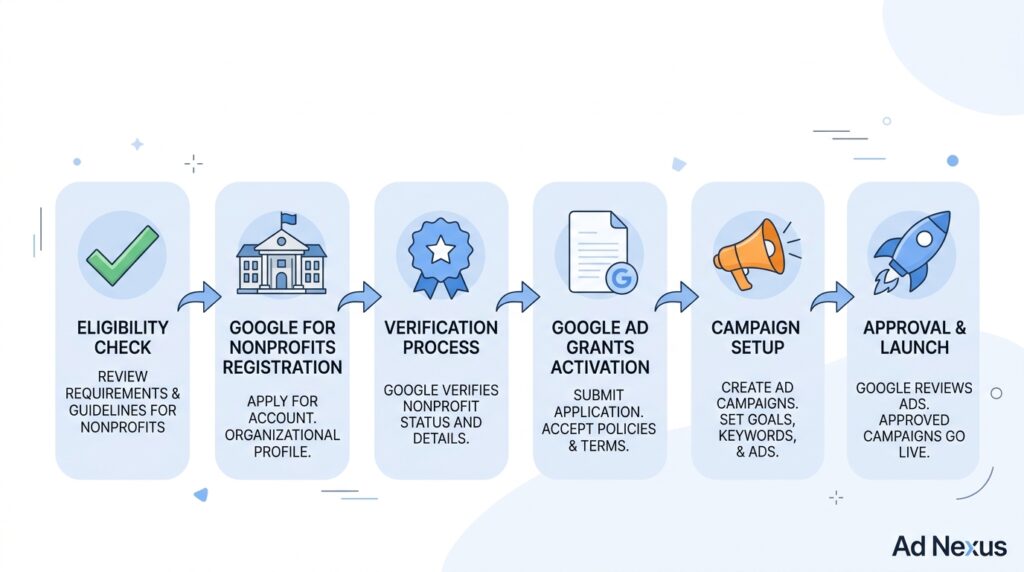
Most guides skip this. Nonprofits ask it constantly.
The application process is not a single form. It’s a sequence of steps across multiple platforms, and the realistic timeline from starting your application to running your first live ad is 4 to 8 weeks, sometimes longer if TechSoup or Goodstack verification runs slow.
To apply for Google Ad Grants, follow these steps:
- Go to Google for Nonprofits (nonprofits.google.com) and create or sign in with a Google account tied to your organization.
- Submit your organization’s details and wait for eligibility review typically 2–14 business days.
- Complete nonprofit verification through TechSoup (US) or Goodstack (UK/Europe) this is a separate process that can take 1–3 weeks.
- Once verified, activate Google for Nonprofits and navigate to the Ad Grants section to enroll.
- Create a new Google Ads account using the Ad Grants enrollment link do NOT create a standard paid Ads account first, or you’ll lose grant eligibility for that account.
- Build at least one active campaign with a minimum of two ad groups and two active ads per group before your account passes Google’s review.
- Submit your account for Ad Grants activation and wait for approval typically 3–5 business days.
Each step is under 15 words. This is the actual process, not a simplified version of it.
The Compliance Rules That Get Accounts Suspended
This is what neither competitor article covers clearly and it’s the part that matters most after you’re approved.
Getting the grant is step one. Keeping it is harder.
Google runs ongoing compliance checks on all Ad Grants accounts. Fail to meet their standards and your account gets suspended sometimes without a detailed warning. Reinstatement is possible but slow.
The three rules that cause the most suspensions:
1. The 5% Click-Through Rate (CTR) requirement
Your account must maintain a minimum 5% CTR across all campaigns every month. That’s not per ad it’s the account-level average. A 5% CTR is significantly above typical paid search benchmarks (which average 3–4% for most industries). To hit it consistently, you need tightly themed ad groups, highly relevant keywords, and compelling ad copy. Broad or generic campaigns will drag your CTR below the threshold fast.
2. The single-word keyword ban
Google Ad Grants accounts cannot bid on single-word keywords. No bidding on donate, cancer, water,or your organization’s name as a single word. Keywords must be two words minimum, and overly generic terms like free help or nonprofit services are also restricted. This forces specificity which, honestly, tends to produce better results anyway.
3. Conversion tracking must be active
Google requires at least one active conversion action tracked in your account at all times. This can be a donation form submission, a newsletter signup, a volunteer application anything measurable. Accounts without active conversion tracking are flagged and can be suspended.
Look, if you’ve set up the account but haven’t configured conversion tracking yet, stop and do that before you launch any campaigns. It’s the fastest route to an avoidable suspension.
One more rule most guides bury in a footnote: Ad Grants accounts have a maximum cost-per-click (CPC) bid cap of $2.00 when using manual bidding. That cap makes it nearly impossible to compete for high-volume commercial keywords. The workaround and it’s a legitimate one is to use Google’s Maximize Conversions or Target CPA smart bidding strategies, which lift the $2 cap automatically. This is one of the most misunderstood technical nuances in grant management.
I’ve seen conflicting data on how often accounts get reinstated after suspension some sources cite a straightforward appeal process, others report multi-week delays with no clear resolution path. My read is that reinstatement is reliable if the violation was accidental and you correct it quickly, but can become genuinely difficult if the account has a history of repeated non-compliance.
Quick Comparison: Google Ad Grants vs Paid Google Ads
| Option | Best For | Key Benefit | Limitation |
| Google Ad Grants | Nonprofits with no paid media budget | $10,000/month free, zero cost | Search only; $2 CPC cap on manual bidding; strict compliance rules |
| Paid Google Ads | Organizations needing scale or Display/YouTube reach | Full campaign type access, no bid caps | Costs money — budgets vary widely |
| Google Ad Grants + Paid Ads | Nonprofits scaling beyond the grant | Grant covers awareness; paid covers competitive terms | Requires two separate accounts, careful management |
Google Ad Grants vs Paid Google Ads: Ad Grants is better suited for nonprofits with limited budgets and informational or mission-driven search intent because the grant covers these campaigns at no cost. Paid Ads work better when you need to compete on high-CPC commercial keywords or run Display and YouTube campaigns. The key difference is budget flexibility and campaign type access.
What You Can and Cannot Do With the $10,000
The $10,000 monthly credit sounds like a lot. Whether it actually is depends entirely on what your nonprofit is trying to accomplish.
The credit resets monthly and does not roll over. The unspent budget disappears at month-end. For nonprofits with thin keyword universes, small local charities, for example, or organizations serving very niche populations, spending the full $10,000 can actually be difficult. Competitive niches (mental health, disaster relief, education access) are easier to spend in, because more people are actively searching.
What the grant can realistically fund:
- Driving traffic to donation pages and fundraising campaigns
- Promoting volunteer recruitment
- Building awareness for specific programs or services
- Capturing search traffic from people looking for help your organization provides
What it cannot fund:
- Remarketing campaigns (Display Network)
- YouTube pre-roll or video ads
- Google Shopping ads
- Any campaign outside of Google Search
Most people assume the grant covers all of Google Ads. It doesn’t. Search only.
Managing Your Google Ad Grants Account Without Burning Out
Running an Ad Grants account isn’t a set-it-and-forget-it exercise. The 5% CTR requirement alone means you need to monitor performance at least weekly, pause underperforming keywords, and refresh ad copy regularly.
Some experts argue that nonprofits should manage their Ad Grants accounts in-house to keep costs down. That’s valid if you have someone with genuine Google Ads experience on staff or the capacity to develop it. But if your marketing team is one person wearing five hats, the opportunity cost of learning account management from scratch often outweighs the savings.
Realistic in-house management requires:
- At least 3–5 hours per week for a moderately active account
- Familiarity with Google Ads interface, keyword match types, and Quality Score
- Monthly reporting against conversion goals
- Quarterly keyword audits to remove low-CTR terms before they drag the account average below 5%
What most guides skip is the account structure question: Ad Grants accounts perform best when organized around specific programs or audience segments, not around broad organizational categories. A food bank that creates separate campaigns for food assistance near me, emergency food bank, and donate to feed families will dramatically outperform one that runs a single campaign with a generic help the hungry keyword cluster.
FAQs
Q: What’s the best way to start the Google Ad Grants application?
A: Start at nonprofits.google.com, create a Google for Nonprofits account, and complete nonprofit verification through TechSoup or Goodstack. Don’t create a standard Google Ads account first it disqualifies that account from receiving the grant.
Q: How do I keep my Google Ad Grants account from getting suspended?
A: Maintain a 5% or higher account-level CTR, keep conversion tracking active at all times, avoid single-word keywords, and log in to your account at least once every 30 days. Inactive accounts are also suspended.
Q: Should I hire someone to manage my Google Ad Grants account?
A: If your team lacks Google Ads experience, yes. The 5% CTR requirement and compliance rules make poor management costly a suspended account loses all grant access until reinstated, which can take weeks.
Q: Why does my Google Ad Grants account have a $2 bid limit?
A: Manual bidding in Ad Grants accounts is capped at $2 CPC by Google policy. Switch to Maximize Conversions or Target CPA smart bidding to remove the cap and compete on higher-value keywords.
Q: When should I use both Google Ad Grants and a paid Google Ads account?
A: When your grant account consistently spends its full $10,000 monthly and you still have unmet demand, or when you need campaign types the grant doesn’t cover Display, YouTube, or Shopping.
This guide works best for nonprofits applying for Google Ad Grants for the first time or auditing an existing account. It won’t address edge cases involving fiscal sponsorship arrangements, international organizations with complex legal structures, or accounts that have been permanently banned rather than temporarily suspended.